

The Game Statistics Authority : ActivePlayer.io
  • ActivePlayer
    • Top 20 PC Games of 2026
    • Popular Game Counters
    • Fortnite Leaderboard
    • Overwatch 2 Leaderboard
    • League of Legends Leaderboard
    • Valorant Leaderboard
    • Apex Legends Leaderboard
  • Twitch
    Rocket League Live Twitch Statistics

    Rocket League Twitch Statistics

    Dark and Darker Live Twitch Statistics

    Dark and Darker Live Twitch Statistics

    Final Fantasy XIV Online Live Twitch Statistics

    Final Fantasy XIV Online Live Twitch Statistics

    Shift at Midnight Twitch Statistics

    Shift at Midnight Live Twitch Statistics

    Path of Exile 2 Twitch Statistics

    Path of Exile 2 Twitch Statistics

    Hearthstone Live Twitch Statistics

    Hearthstone Live Twitch Statistics

    EA Sports FC 26 Twitch Statistics

    EA Sports FC 26 Twitch Statistics

    Brawl Stars Twitch Statistics

    Brawl Stars Twitch Statistics

    Nioh 3 Live Twitch Statistics

    Nioh 3 Twitch Statistics

  • Down Checker
    • Roblox Down Checker
    • Fortnite Down Checker
    • Genshin Impact Down Checker
    • Valorant Down Checker
    • Overwatch 2 Down Checker
    • Rainbow 6 Siege Down Checker
    • Apex Legends Down Checker
    • Destiny 2 Down Checker
    • Tarkov Live Status Checker
  • Tools
    • Fortnite Battle Royale Stats Tracker
    • Robux Conversion Caclculator
    • Riot Points to USD/Dollar Value Calculator
    • Fortnite V-Bucks to USD Calculator
    • Starfield Ship Name Generator
    • Top Guns in Warzone 2.0
  • Platform
    • Mobile
    • PC
    • PS5
    • PS4
    • XBOX
    • SWITCH
No Result
View All Result
  • ActivePlayer
    • Top 20 PC Games of 2026
    • Popular Game Counters
    • Fortnite Leaderboard
    • Overwatch 2 Leaderboard
    • League of Legends Leaderboard
    • Valorant Leaderboard
    • Apex Legends Leaderboard
  • Twitch
    Rocket League Live Twitch Statistics

    Rocket League Twitch Statistics

    Dark and Darker Live Twitch Statistics

    Dark and Darker Live Twitch Statistics

    Final Fantasy XIV Online Live Twitch Statistics

    Final Fantasy XIV Online Live Twitch Statistics

    Shift at Midnight Twitch Statistics

    Shift at Midnight Live Twitch Statistics

    Path of Exile 2 Twitch Statistics

    Path of Exile 2 Twitch Statistics

    Hearthstone Live Twitch Statistics

    Hearthstone Live Twitch Statistics

    EA Sports FC 26 Twitch Statistics

    EA Sports FC 26 Twitch Statistics

    Brawl Stars Twitch Statistics

    Brawl Stars Twitch Statistics

    Nioh 3 Live Twitch Statistics

    Nioh 3 Twitch Statistics

  • Down Checker
    • Roblox Down Checker
    • Fortnite Down Checker
    • Genshin Impact Down Checker
    • Valorant Down Checker
    • Overwatch 2 Down Checker
    • Rainbow 6 Siege Down Checker
    • Apex Legends Down Checker
    • Destiny 2 Down Checker
    • Tarkov Live Status Checker
  • Tools
    • Fortnite Battle Royale Stats Tracker
    • Robux Conversion Caclculator
    • Riot Points to USD/Dollar Value Calculator
    • Fortnite V-Bucks to USD Calculator
    • Starfield Ship Name Generator
    • Top Guns in Warzone 2.0
  • Platform
    • Mobile
    • PC
    • PS5
    • PS4
    • XBOX
    • SWITCH
No Result
View All Result
The Game Statistics Authority : ActivePlayer.io
No Result
View All Result

Rocket League PC settings: fix the thing you can actually see

A corner drill, a repeatable graphics test and two PC graphs help you tell which setting deserves your attention.

Home Learn

If you lose the ball halfway through the same corner in Rocket League, changing every slider at once makes the problem harder to pin down. Start with that corner. A ball slipping out of frame, a car steering when you let go, and a ball jumping backward online can feel remarkably similar while you’re playing. They call for three different fixes.

Here’s the short version: use Camera for what you can see, Controls for how the car responds and Video for how smoothly the PC draws it. The examples below give you something repeatable to try. Your monitor, controller and distance from the screen all matter more than copying someone else’s preset.

1. Build a camera view you can read through a turn

Take a screenshot of your current Camera settings so you can get them back. In Free Play, take the ball toward a side wall, follow it into the corner, then turn back toward midfield. Use the same camera mode and approach speed on each pass. Pay attention to the moment you lose the ball: does it leave the edge of the screen, disappear behind the car or get lost in the shake after contact?
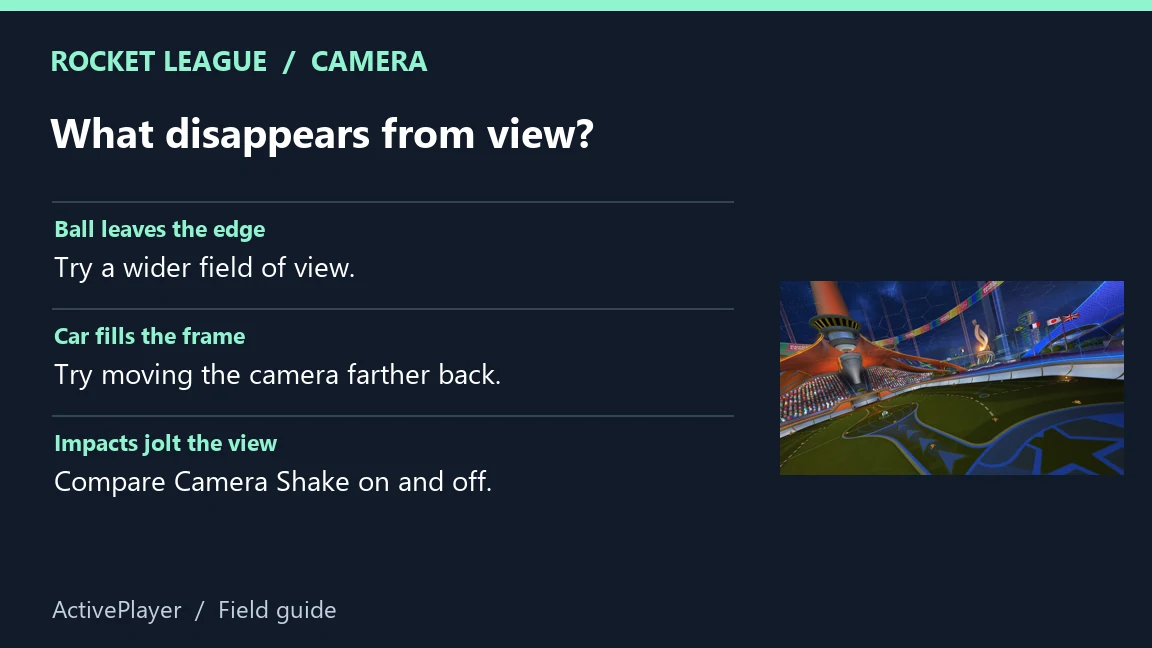
Rocket League arena beside a guide to field of view, distance and camera shake
Repeat the same corner approach for each comparison. ActivePlayer diagram with Psyonix arena artwork.

If the ball leaves the side of the screen, try widening Camera FOV by one increment. If the car blocks your view, try moving Camera Distance back one increment instead. A wider view lets you see more of the field, but a more distant ball also looks smaller. Keep the change only if you can still judge the next touch. If impacts are the distraction, switch Camera Shake off and repeat the same challenge. Epic’s camera guide explains each control.

Check your controller before moving the camera again

On a controller, drive straight in Free Play and let the steering stick return to center. If the car consistently pulls to one side, note your Controller Deadzone and try a small increase. Then try a gentle turn. A setting that masks drift can also ignore a small steering input you meant to make. Dodge Deadzone answers a different question: how far you must tilt the stick to dodge when you jump again. If a planned double jump turns into a backflip, check that setting separately. Keep your original values handy.

2. Change one graphics setting and repeat the same play

Open Settings → Video from the lobby. For a PC dropping frames, Epic suggests trying FXAA Low or Off and lowering Render Quality or Render Detail. Start with one of these changes. Run the same corner drill, using the same arena and camera. If the change buys smoother turns but makes a distant ball hard to pick out, restore it and try a different option. Epic’s PC video-settings instructions.
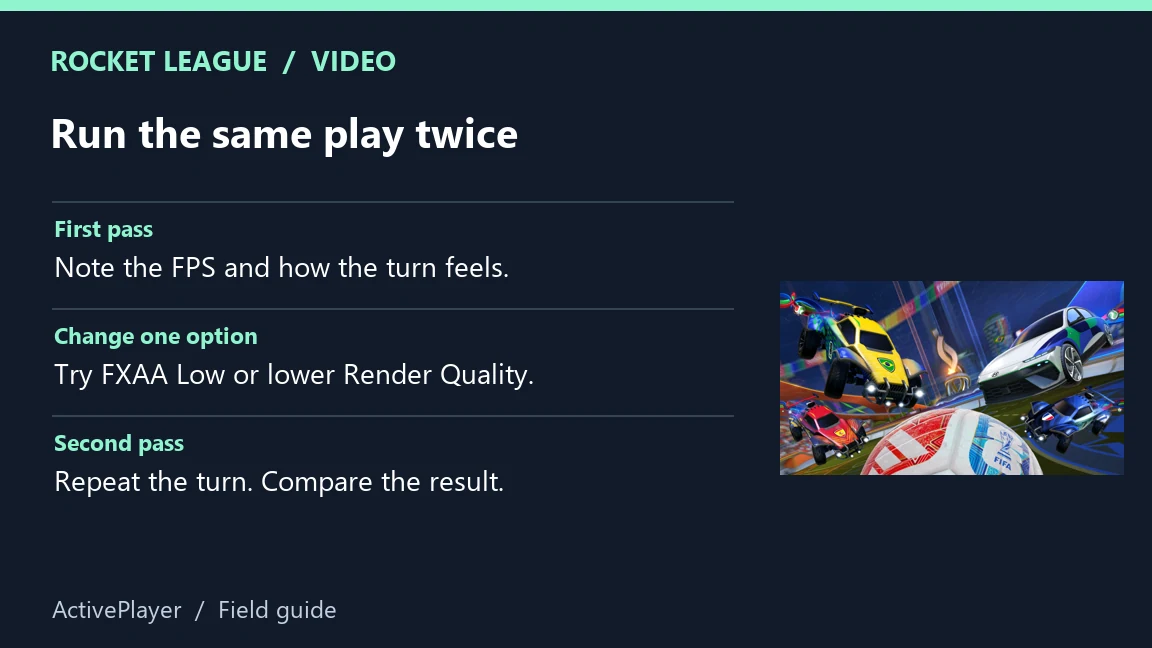
Rocket League cars and ball beside a before-and-after video settings test
Use the same arena and turn so both passes are comparable. ActivePlayer diagram with Psyonix artwork.
What you noticeFirst comparisonWhat to look for
A hitch when effects fill the screenLower Particle Detail, then repeatDoes the hitch still occur at the same point?
A blurry ball at midfieldRestore Render QualityCan you judge the bounce earlier?
The car moves smoothly in Free Play but jumps onlineKeep the video settings for nowCompare latency and packet loss in an online match.

3. Use the PC graphs to separate stutter from connection problems

Open Settings → Interface → Performance Graphs. Choose Performance Summary first. FPS tells you how many frames the game draws each second. Frame time tells you how long a frame took, which helps explain why a seemingly decent average can still feel rough. As a reference, 60 evenly spaced frames per second leave about 16.7 milliseconds per frame. That’s arithmetic, not a target every PC needs to hit.
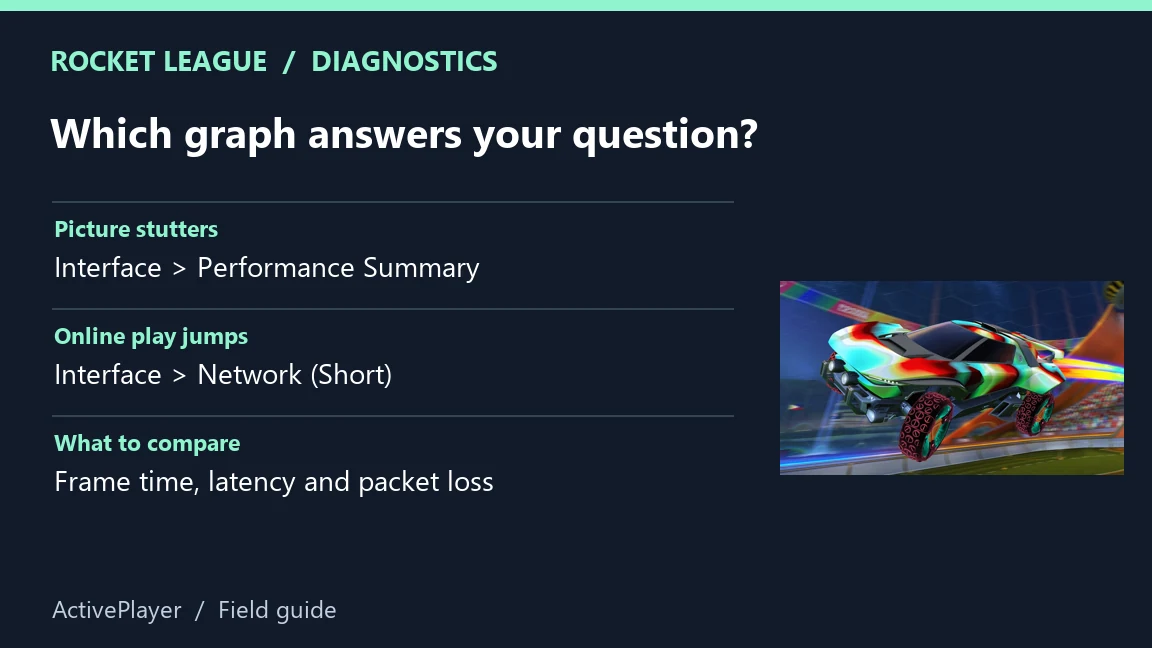
Rocket League car beside a diagram matching stutter and online jumps to the appropriate graphs
Choose the graph that measures the symptom you see. ActivePlayer diagram with Psyonix artwork.

When the game draws smoothly but the ball seems to snap to another position online, switch to Network (Short). Look at latency and incoming or outgoing packet loss when the jump happens. A spike gives you a reason to investigate the connection. One spike alone can’t identify which device or service caused it. Epic explains what the PC graphs measure.

Keep a preset when it fixes your original problem on repeat attempts. If your next issue is getting the right progression to show up on another platform, our ActivePlayer cross-play and progression guide covers that separate setup.

Tags: Game settingsPC gamingRocket League
ShareTweet

Leave a Reply Cancel reply

Your email address will not be published. Required fields are marked *

I agree to the Terms & Conditions and Privacy Policy.

Top Games (30 Days)

  • 1 Fortnite 🔥
  • 2 Counter Strike 2
  • 3 Battlefield 6🔥
  • 4 League of Legends
  • 5 PUBG: Battlegrounds
  • 6 Overwatch 2
  • 7 Dota 2
  • 8 Valorant
  • 9 Genshin Impact
  • 10 CoD: Black Ops 6
  • About
  • Advertise
  • Privacy & Policy
  • Contact
ActivePlayer.io - Game Statistics Authority

© 2022 ActivePlayer.io Game Statistics Authority - Premium and Free Game Statistics and Data ActivePlayer.io.

No Result
View All Result
  • ActivePlayer
    • Top 20 PC Games of 2026
    • Popular Game Counters
    • Fortnite Leaderboard
    • Overwatch 2 Leaderboard
    • League of Legends Leaderboard
    • Valorant Leaderboard
    • Apex Legends Leaderboard
  • Twitch
  • Down Checker
    • Roblox Down Checker
    • Fortnite Down Checker
    • Genshin Impact Down Checker
    • Valorant Down Checker
    • Overwatch 2 Down Checker
    • Rainbow 6 Siege Down Checker
    • Apex Legends Down Checker
    • Destiny 2 Down Checker
    • Tarkov Live Status Checker
  • Tools
    • Fortnite Battle Royale Stats Tracker
    • Robux Conversion Caclculator
    • Riot Points to USD/Dollar Value Calculator
    • Fortnite V-Bucks to USD Calculator
    • Starfield Ship Name Generator
    • Top Guns in Warzone 2.0
  • Platform
    • Mobile
    • PC
    • PS5
    • PS4
    • XBOX
    • SWITCH

© 2022 ActivePlayer.io Game Statistics Authority - Premium and Free Game Statistics and Data ActivePlayer.io.