




The Game Statistics Authority : ActivePlayer.io
  • ActivePlayer
    • Top 20 PC Games of 2026
    • Popular Game Counters
    • Fortnite Leaderboard
    • Overwatch 2 Leaderboard
    • League of Legends Leaderboard
    • Valorant Leaderboard
    • Apex Legends Leaderboard
  • Twitch
    Rocket League Live Twitch Statistics

    Rocket League Twitch Statistics

    Dark and Darker Live Twitch Statistics

    Dark and Darker Live Twitch Statistics

    Final Fantasy XIV Online Live Twitch Statistics

    Final Fantasy XIV Online Live Twitch Statistics

    Shift at Midnight Twitch Statistics

    Shift at Midnight Live Twitch Statistics

    Path of Exile 2 Twitch Statistics

    Path of Exile 2 Twitch Statistics

    Hearthstone Live Twitch Statistics

    Hearthstone Live Twitch Statistics

    EA Sports FC 26 Twitch Statistics

    EA Sports FC 26 Twitch Statistics

    Brawl Stars Twitch Statistics

    Brawl Stars Twitch Statistics

    Nioh 3 Live Twitch Statistics

    Nioh 3 Twitch Statistics

  • Down Checker
    • Roblox Down Checker
    • Fortnite Down Checker
    • Genshin Impact Down Checker
    • Valorant Down Checker
    • Overwatch 2 Down Checker
    • Rainbow 6 Siege Down Checker
    • Apex Legends Down Checker
    • Destiny 2 Down Checker
    • Tarkov Live Status Checker
  • Tools
    • Fortnite Battle Royale Stats Tracker
    • Robux Conversion Caclculator
    • Riot Points to USD/Dollar Value Calculator
    • Fortnite V-Bucks to USD Calculator
    • Starfield Ship Name Generator
    • Top Guns in Warzone 2.0
  • Platform
    • Mobile
    • PC
    • PS5
    • PS4
    • XBOX
    • SWITCH
No Result
View All Result
  • ActivePlayer
    • Top 20 PC Games of 2026
    • Popular Game Counters
    • Fortnite Leaderboard
    • Overwatch 2 Leaderboard
    • League of Legends Leaderboard
    • Valorant Leaderboard
    • Apex Legends Leaderboard
  • Twitch
    Rocket League Live Twitch Statistics

    Rocket League Twitch Statistics

    Dark and Darker Live Twitch Statistics

    Dark and Darker Live Twitch Statistics

    Final Fantasy XIV Online Live Twitch Statistics

    Final Fantasy XIV Online Live Twitch Statistics

    Shift at Midnight Twitch Statistics

    Shift at Midnight Live Twitch Statistics

    Path of Exile 2 Twitch Statistics

    Path of Exile 2 Twitch Statistics

    Hearthstone Live Twitch Statistics

    Hearthstone Live Twitch Statistics

    EA Sports FC 26 Twitch Statistics

    EA Sports FC 26 Twitch Statistics

    Brawl Stars Twitch Statistics

    Brawl Stars Twitch Statistics

    Nioh 3 Live Twitch Statistics

    Nioh 3 Twitch Statistics

  • Down Checker
    • Roblox Down Checker
    • Fortnite Down Checker
    • Genshin Impact Down Checker
    • Valorant Down Checker
    • Overwatch 2 Down Checker
    • Rainbow 6 Siege Down Checker
    • Apex Legends Down Checker
    • Destiny 2 Down Checker
    • Tarkov Live Status Checker
  • Tools
    • Fortnite Battle Royale Stats Tracker
    • Robux Conversion Caclculator
    • Riot Points to USD/Dollar Value Calculator
    • Fortnite V-Bucks to USD Calculator
    • Starfield Ship Name Generator
    • Top Guns in Warzone 2.0
  • Platform
    • Mobile
    • PC
    • PS5
    • PS4
    • XBOX
    • SWITCH
No Result
View All Result
The Game Statistics Authority : ActivePlayer.io
No Result
View All Result

Battlefield 6 PC settings: how to tune frame rate, visibility and aim

A repeatable firing-range check helps you decide which graphics, field-of-view and input changes are worth keeping.

Home Learn

Before you drag every Battlefield 6 slider to Low, watch what happens when the next objective gets busy. Does the whole picture hitch when smoke rolls in? Does the picture stay fluid while the camera shakes so much you lose the doorway? Or does your sight sail past the doorway when you move the mouse? Those are three different problems. Walk through the one you actually have.

  • The picture hitches — establish a frame-rate target and narrow down the expensive effects.
  • The picture is smooth but hard to read — separate camera movement from the amount of the scene you can see.
  • Your aim overshoots — tune the device you use on foot, then check the vehicle controls separately.

1. Find out what your display and PC can sustain

Open Settings → Graphics and note your Performance Preset and Graphics Quality. Under Display, match Fullscreen Resolution and Refresh Rate to your display. If the menu is still set to 60 Hz on a 144 Hz screen, fix that first. Now pick a stretch of the Firing Range where you can repeat the same movement, then compare it with a busy objective in multiplayer.
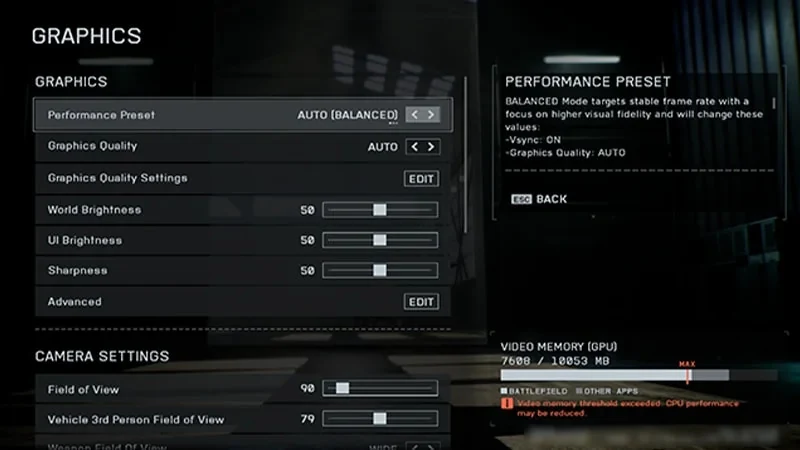
Battlefield 6 Graphics menu showing Performance Preset, Graphics Quality and brightness controls.
The Graphics screen gives you a starting point you can write down. If a change makes things worse, return to this preset before trying the next one. EA Help.

Here’s a useful way to read an FPS target. At 60 FPS your PC has roughly 16.7 milliseconds to draw each frame. At 120 FPS it has 8.3 ms, and at 144 FPS just 6.9 ms. Those figures come from dividing 1,000 by the frame rate. An average can look healthy while a single long frame produces a hitch you can feel.

When the hitch appearsTry this change first
Smoke, dust or an explosion fills the viewLower Effects Quality one notch and repeat. If it still hitches, try Volumetric Quality separately.
You move through dense greeneryCompare the same route with Undergrowth Quality one notch lower.
You turn toward a lit interior or a sunlit courtyardTest Local Light & Shadow Quality for the interior or Sun Shadow Quality for the courtyard. Keep a change only if the same turn feels smoother.

Those controls are on EA’s list of graphics settings to tune. Treat the first column as a way to choose a test. If the range is smooth but the same hitch returns on a crowded objective, that match is the comparison that matters. ActivePlayer.io’s look at Battlefield 6’s multiplayer launch gives some context for the scale of the fights.

2. Keep the doorway readable while you move

Turn down World Motion Blur, Weapon Motion Blur and Camera Shake Amount. Strafe past a doorway, turn back and see whether you can still pick out its edge. If the visual noise comes from the interface itself, EA also puts Soldier HUD Motion and Vehicle HUD Motion under Interface and HUD. You can switch either off independently.

Next, stand still in the range and line up a distant target. Raising the general Field Of View brings more of the surroundings into frame and makes that distant target look smaller. Weapon Field of View changes the framing of the weapon in your hands. Compare Wide and Narrow without moving. Look at the gun’s footprint against the floor markings in EA’s example, then decide how much of the lower screen you want to give it.
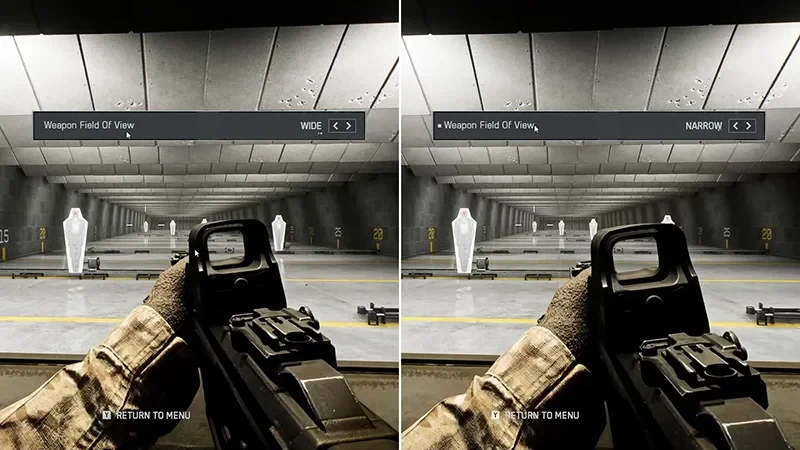
Side-by-side Battlefield 6 firing-range views show the Wide and Narrow weapon field of view.
Same range, different weapon framing. Follow the floor line beside the gun to see how much of the lower view each option occupies. EA Help.

3. Set infantry aim first, then check your vehicle profile

Mouse starting pointInfantry sensitivity 20. Zoom coefficient 178. Vehicle sensitivity 20–40.
Controller starting pointInfantry sensitivity 30–40. Left/right acceleration 50–70. Vertical aim ratio 56.

EA suggests the starting values above. On mouse, leave DPI alone, pick a target in the range and turn away. Bring the sight back with one comfortable movement. If you repeatedly cross the target, lower infantry sensitivity slightly. If it takes a second sweep to reach it, try a small increase. Repeat before touching zoom.

On controller, make a slow horizontal sweep and then a fast turn. These test different parts of the response. If the sight drifts with both thumbs off the sticks, check Controller → Edit Settings → Controller Tuning before changing sensitivity again.

When it only feels wrong in a vehicle

Open vehicle control mapping and read the labels on the shoulder buttons and sticks. If infantry feels right but you keep pressing the wrong action after climbing into a vehicle, compare your layout with the diagram before changing aim speed.
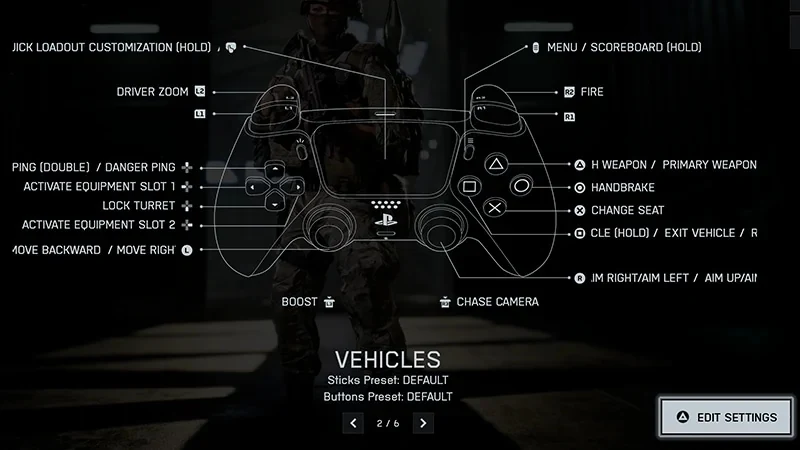
Battlefield 6 vehicle control-mapping screen with labels around a controller diagram.
This is the vehicle controller layout. Read the labels around the sticks and triggers before comparing a different vehicle preset. EA Help.

For the last check, take your saved settings into one round and revisit the exact action that bothered you. The official multiplayer trailer shows why a quiet range and an effects-heavy vehicle fight make quite different tests.

Tags: Battlefield 6Game settingsPC gaming
ShareTweet

Leave a Reply Cancel reply

Your email address will not be published. Required fields are marked *

I agree to the Terms & Conditions and Privacy Policy.

Top Games (30 Days)

  • 1 Fortnite 🔥
  • 2 Counter Strike 2
  • 3 Battlefield 6🔥
  • 4 League of Legends
  • 5 PUBG: Battlegrounds
  • 6 Overwatch 2
  • 7 Dota 2
  • 8 Valorant
  • 9 Genshin Impact
  • 10 CoD: Black Ops 6
  • About
  • Advertise
  • Privacy & Policy
  • Contact
ActivePlayer.io - Game Statistics Authority

© 2022 ActivePlayer.io Game Statistics Authority - Premium and Free Game Statistics and Data ActivePlayer.io.

No Result
View All Result
  • ActivePlayer
    • Top 20 PC Games of 2026
    • Popular Game Counters
    • Fortnite Leaderboard
    • Overwatch 2 Leaderboard
    • League of Legends Leaderboard
    • Valorant Leaderboard
    • Apex Legends Leaderboard
  • Twitch
  • Down Checker
    • Roblox Down Checker
    • Fortnite Down Checker
    • Genshin Impact Down Checker
    • Valorant Down Checker
    • Overwatch 2 Down Checker
    • Rainbow 6 Siege Down Checker
    • Apex Legends Down Checker
    • Destiny 2 Down Checker
    • Tarkov Live Status Checker
  • Tools
    • Fortnite Battle Royale Stats Tracker
    • Robux Conversion Caclculator
    • Riot Points to USD/Dollar Value Calculator
    • Fortnite V-Bucks to USD Calculator
    • Starfield Ship Name Generator
    • Top Guns in Warzone 2.0
  • Platform
    • Mobile
    • PC
    • PS5
    • PS4
    • XBOX
    • SWITCH

© 2022 ActivePlayer.io Game Statistics Authority - Premium and Free Game Statistics and Data ActivePlayer.io.